
Evaluations
Say your app has a support bot and you rewrite its prompt to make the answers shorter. Did they stay correct? Reading ten answers by hand tells you something. Reading them again after every change to the prompt, the model or the code around them does not scale. An evaluation does that reading for you, before you ship.
What Is an Evaluation?
An evaluation is a test for your AI code. It takes a fixed list of questions you have picked, asks your code every one of them, and grades each answer. Four words come up on this page and on the dashboard:
- A dataset is the list of questions. Each entry is an example: the input your code gets and, when you know it, the answer you expect.
- A scorer grades one answer. It can be a simple check (does the answer mention a refund?), a comparison with the expected answer, or a call to another model that rates the answer.
- A run is one pass over the whole dataset: every example's answer with its scores. Spectra saves each run, so you can put the run after your change next to the run before it and see what moved, example by example.
A model doesn't always give the same answer twice, so you read an evaluation as a whole: the share of examples that passed, and the examples whose answer or scores changed, rather than any one answer.
Each example runs in a trace of its own, so its AI calls are tracked like any other: their cost, tokens and latency show on the run, and the trace page shows exactly what was sent.
Datasets
An evaluation needs a dataset to run over: a named list of examples, each with an input and, optionally, the output you expect. It is created the first time you add to it:
use Spectra\Facades\Spectra;

Spectra::dataset('refund-questions')->add(['question' => 'How long does a refund take?'], expected: 'Five to ten business days.');
You can also save real calls from the dashboard. Datasets explains what makes a good one and every way to add, change and view examples.
Writing an Evaluation
An evaluation is a class that extends Spectra\Evaluations\Evaluation and answers three questions: which dataset to run over, how to get an answer for one example, and how to grade it. Put it in app/Evals:
namespace App\Evals;

use App\Support\SupportAgent;
use Illuminate\Support\Str;
use Spectra\Evaluations\Evaluation;
use Spectra\Evaluations\Scorers\Contains;
use Spectra\Evaluations\Scorers\ExactMatch;
use Spectra\Models\SpectraDatasetExample;

class SupportAnswerEval extends Evaluation
{
    public function dataset(): string
    {
        return 'refund-questions';
    }

    public function run(mixed $input, SpectraDatasetExample $example): mixed
    {
        return app(SupportAgent::class)->answer($input['question']);
    }

    public function scorers(): array
    {
        return [
            'mentions_refund' => new Contains('refund'),
            'exact' => new ExactMatch,
            'short' => fn (string $output) => Str::length($output) < 400,
        ];
    }
}dataset()names the dataset to run over.run()gets one example's input and returns your code's answer. Call your code the way your app does, so the evaluation tests what users get. Spectra tracks the AI calls it makes.scorers()lists the grades, each with a name and a way to compute it. A scorer gets the output, the expected output and the input, and returnstrueorfalse, a number, a category, ornullto give no score for that example.
The evaluation's name on the dashboard is its class name in kebab case (support-answer-eval); override name() to change it. The class is resolved from the container, so its constructor can take your services.
Built-in Scorers
Two scorers ship with Spectra. Any other check is a closure, like short above.
| Scorer | Scores |
|---|---|
new ExactMatch | Whether the output equals the expected output. Strings are compared trimmed and case-insensitively (new ExactMatch(caseSensitive: true) to keep case); anything else as JSON. No score without an expected output. |
new Contains('refund') | Whether the output contains every given string (new Contains(['refund', '30 days'])), or, with none given, the expected output. Case-insensitive unless caseSensitive: true. |
A model as the judge. Some answers have no single right wording, so no string check can grade them. Have a model do it: write the scorer as a closure that sends the question, the expected answer and the output to a model and returns its rating. The judge's own calls are tracked in the example's trace too, so you can see what the judging costs.
Running an Evaluation
Run it with spectra:eval, by class name or by its name in App\Evals:
php artisan spectra:eval SupportAnswerEval
php artisan spectra:eval SupportAnswerEval --limit=10
The command runs every example of the dataset (or the first --limit), in order, and prints one row per scorer:
 Score             Result     Examples
 mentions_refund   87.5% yes  8
 exact             62.5% yes  8
 short             100% yes   8

8 examples, 0 with errors. Run 0196f3c2-….
87.5% yes means seven of the eight answers passed mentions_refund. A numeric scorer shows its average, and a categorical one how often each label was given.
Each example runs in a fresh trace, inside a span named after the evaluation and tagged eval, so the evaluation's calls are easy to tell from real traffic: filter the requests list by the eval tag. An example whose code throws is saved with the error and gets no scores; the run carries on. A scorer that throws gives no score for that example, and the exception goes to your exception handler.
Every score is also saved as a score on the example's trace, so the trace page shows it.
To run an evaluation from code, such as a test or a scheduled job, use the runner:
use Spectra\Support\Evaluations\EvaluationRunner;

$run = app(EvaluationRunner::class)->run(new SupportAnswerEval, metadata: ['commit' => $sha]);

$run->summary; // ['exact' => ['type' => 'boolean', 'count' => 8, 'average' => 0.625], ...]
Comparing Runs
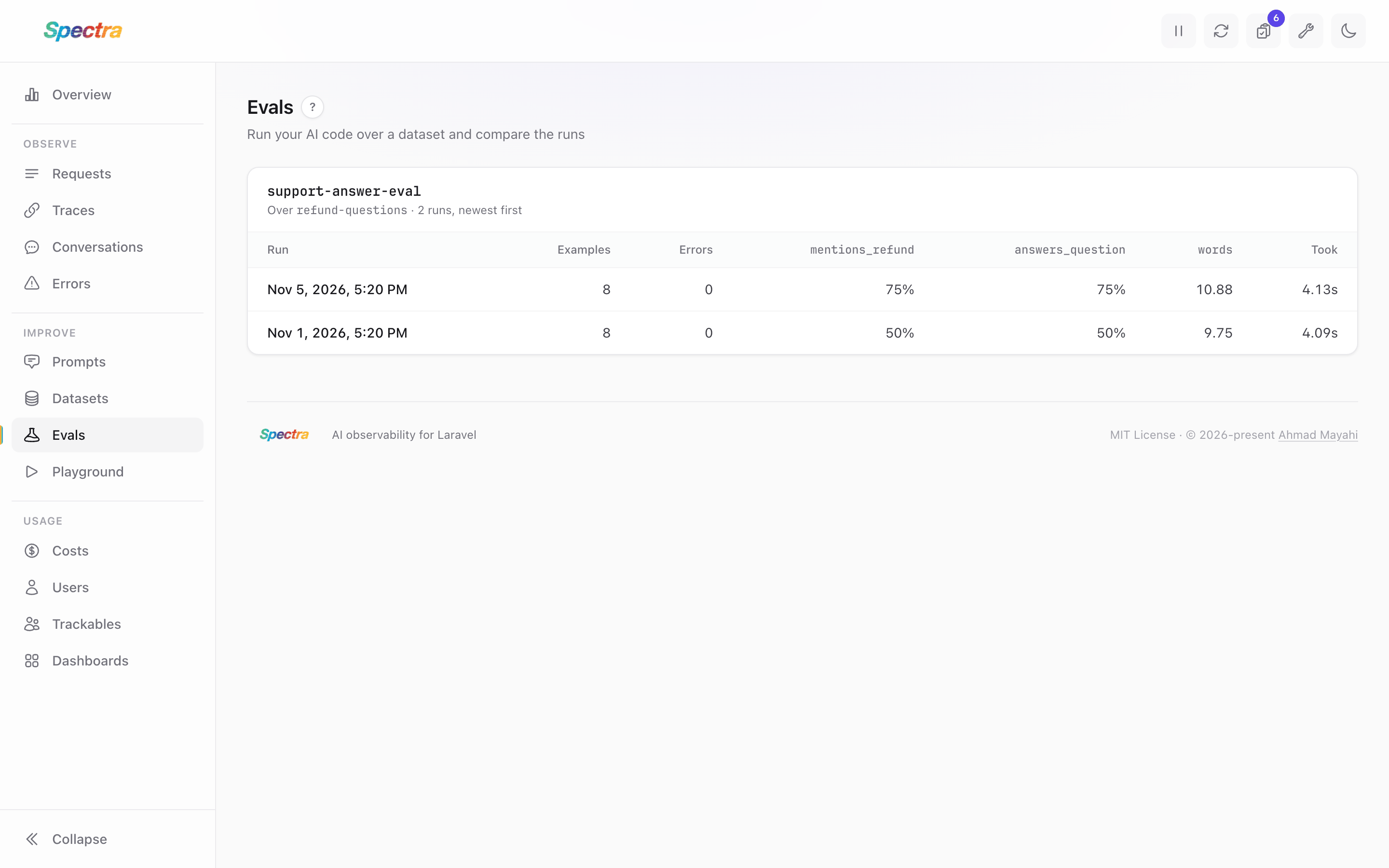
A run on its own tells you how your code does today. Two runs tell you whether a change helped. The dashboard's Evals screen lists each evaluation with its latest runs and every scorer's result per run.
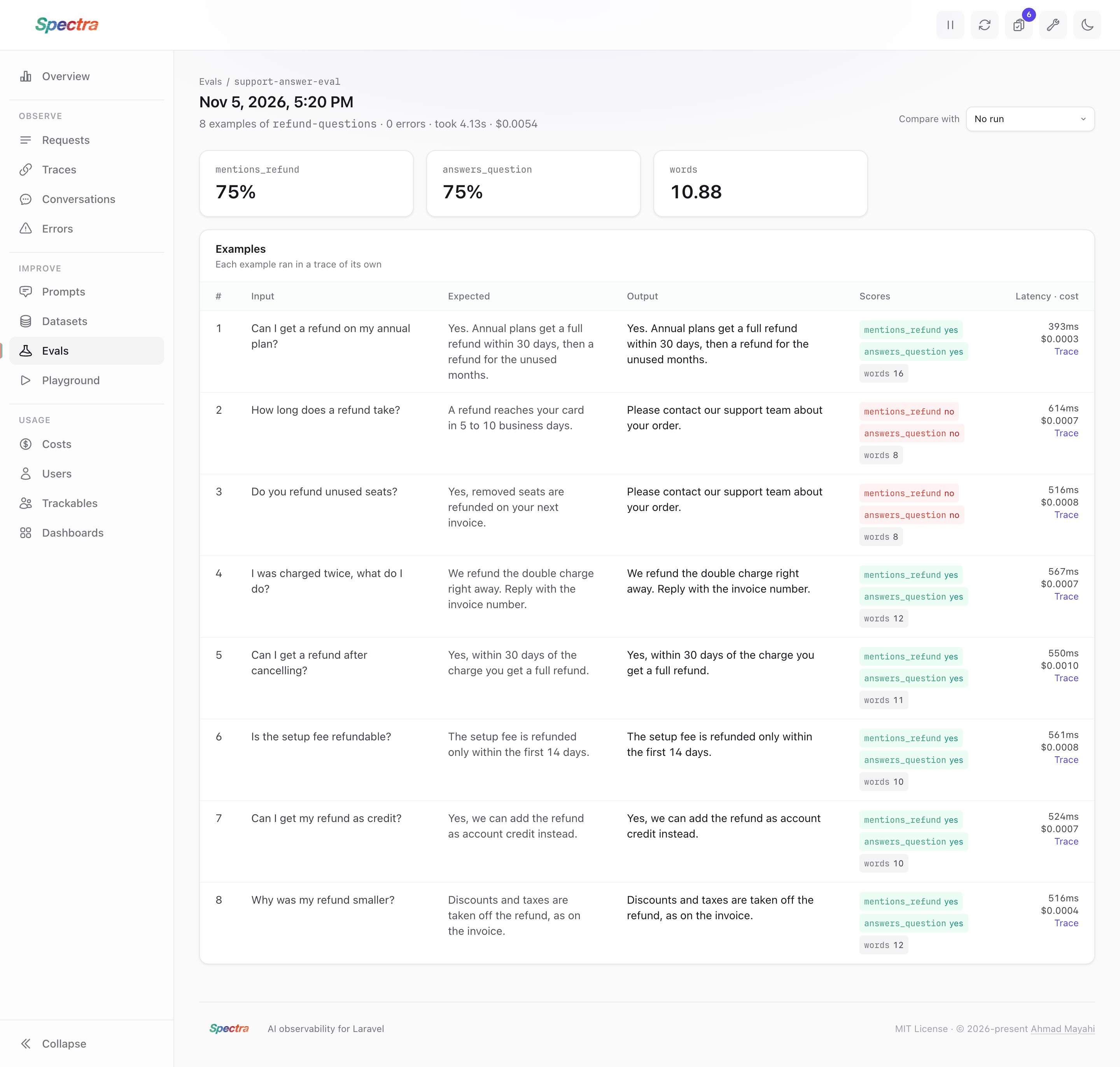
Open a run to see each example's input, expected output, output, scores, latency and cost, with a link to its trace.
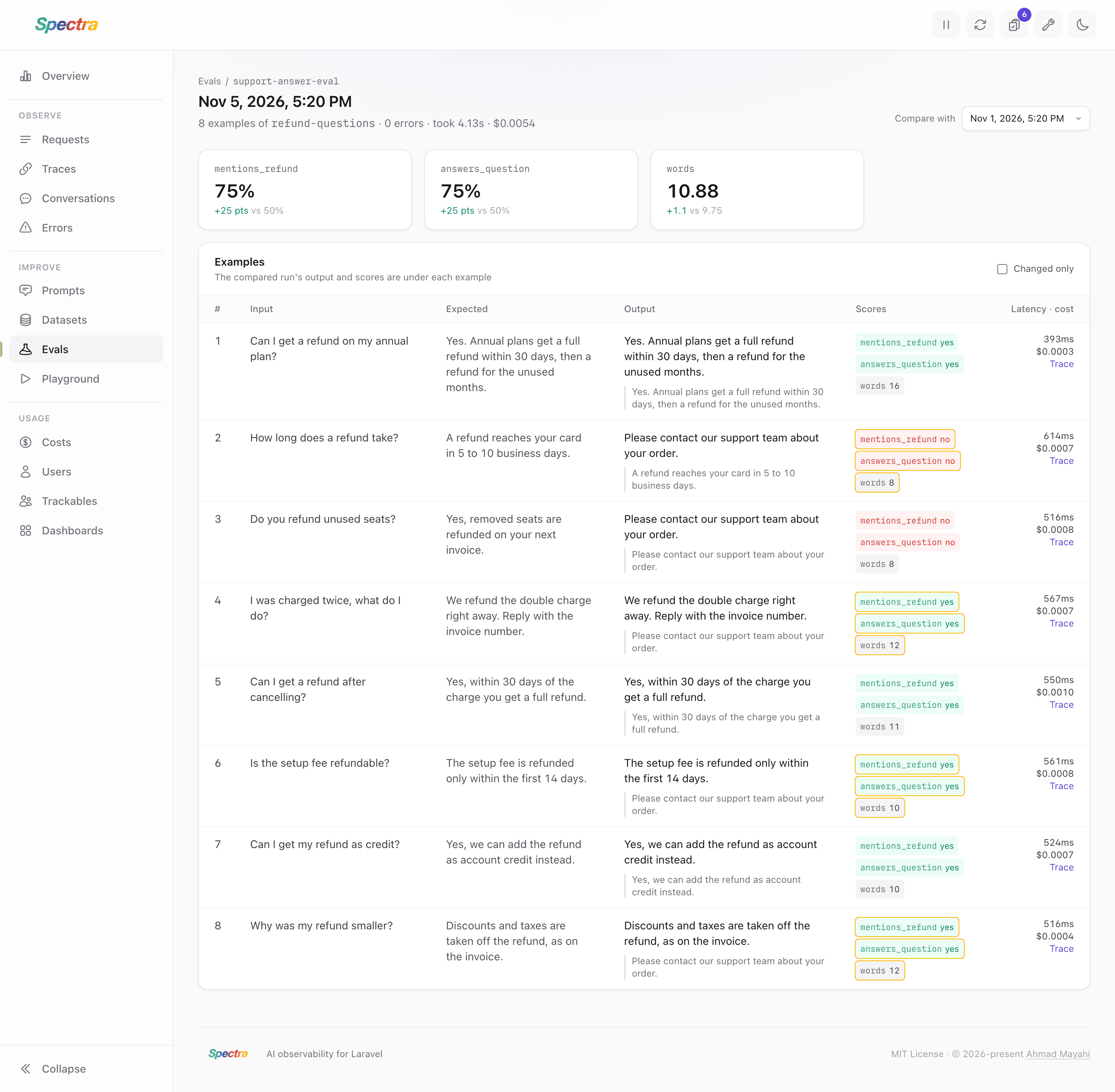
Pick an earlier run under Compare with to see:
- each scorer's change, in points for yes/no scores;
- the earlier run's output under each example's;
- the scores that changed, outlined, with the earlier value on hover;
- Changed only, to hide the examples whose output and scores stayed the same.
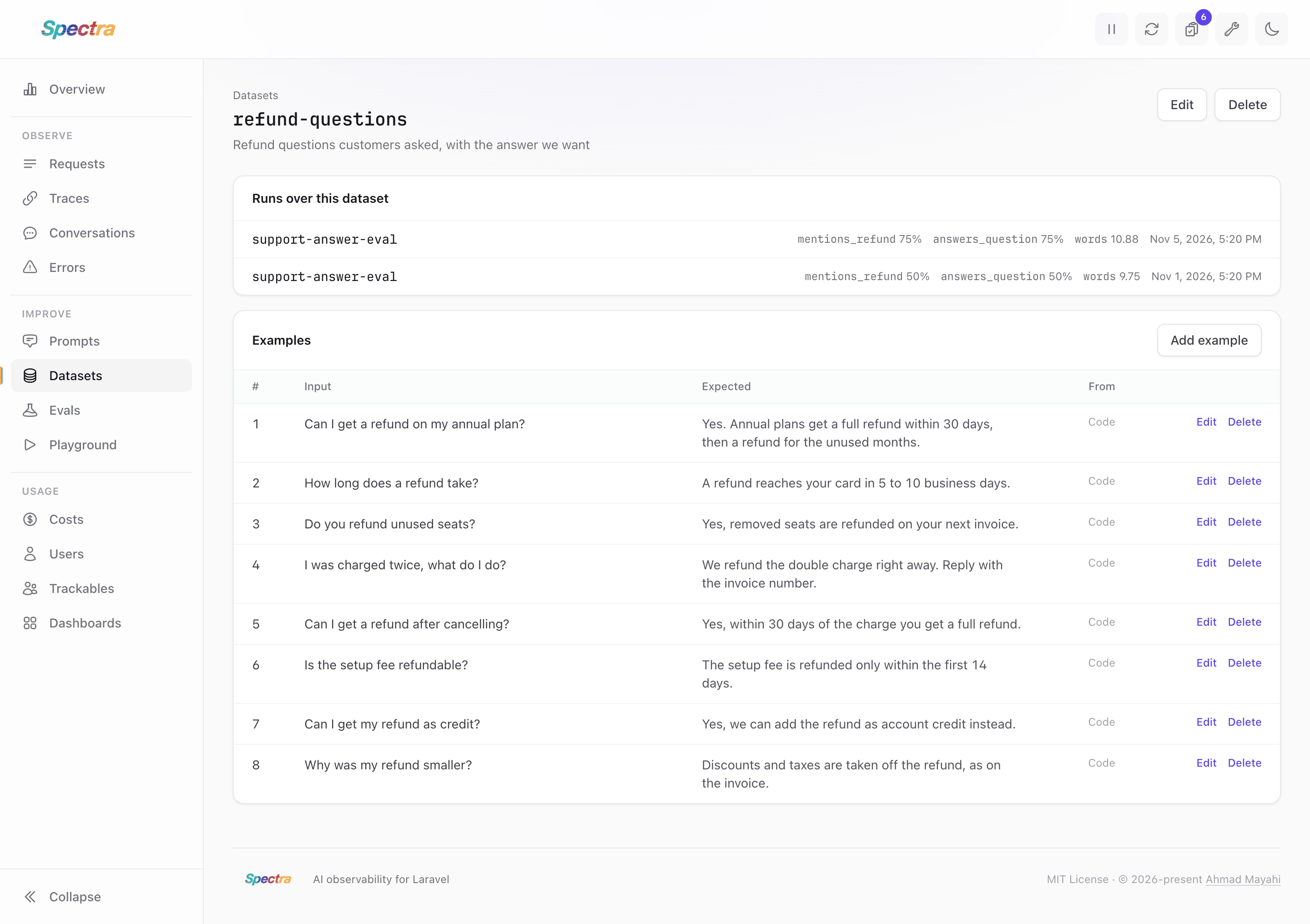
The Datasets screen lists your datasets, and a dataset's page lists its examples and the runs over it.
Storage
Datasets, examples, runs and results are stored in four tables, added by the evaluation migration. A result keeps the input and expected output as they were when it ran, so editing a dataset doesn't change past runs. Outputs longer than 20,000 characters are cut.
spectra:prune doesn't delete datasets or runs: they are yours to keep. The traces of old runs are pruned like any other.