
Tools
Many AI features let the model do more than write text. The model can ask your code to look up an order, search your documents or call another API, and use what comes back in its reply. Providers call this tool calling or function calling. Spectra shows these steps in the trace, so you can see what the model asked for, what it got back, and how long each step took.
What Is a Tool?
A tool is a function you describe to the model: its name, what it does and what arguments it takes. The model never runs it. When the model decides it needs the tool, its reply contains a tool call: the tool's name and the arguments to pass. Your code runs the function, sends the result back to the model in the next request, and the model carries on. An agent loop is that cycle repeated until the model answers without asking for a tool.
Most of an agent's time is often spent in those steps, not in the model. Spectra draws each one in the trace as a tool span, between the AI calls around it, with the arguments the model passed and the result it got back.
There are two ways to get tool spans: run your tools through Spectra::tool(), which also records a tool that threw, so you can tell a slow search from a broken one; or let Spectra find the tools in the requests that send their results back to the model.
Running a Tool
Wrap the code that runs a tool in Spectra::tool(), with the tool's name and the arguments the model passed:
use Spectra\Facades\Spectra;

foreach ($response->choices[0]->message->toolCalls as $call) {
    $arguments = json_decode($call->function->arguments, true);

    $results[] = Spectra::tool($call->function->name, fn () => $this->tools->run($call->function->name, $arguments), $arguments, id: $call->id);
}
tool() returns what the callback returns. The span is timed to the millisecond, and stores:
- the tool's name and, when you pass it, the tool call id from the model's reply;
- the arguments and the result, as arrays or strings, cut to 10,000 characters;
- whether the tool threw. The exception is re-thrown unchanged, and the span keeps the arguments and the error message.
Spectra::tool() always records its span; it doesn't need tool_spans. Like Spectra::span(), it nests under the span it runs in, and starts a trace for its duration outside one.
Tools the Model Asked For
Turn on tool_spans to draw the tools of an agent loop without changing its code:
SPECTRA_TOOL_SPANS=trueWhen an AI call sends tool results back to the model, Spectra records a span per result: from the end of the previous AI call of the trace, when the model asked for the tool, to the start of this call, when the result went back. Spectra reads the tool's name and arguments from the model's tool call in the same request body, so it works with streamed replies too. It understands:
| API | Tool results |
|---|---|
| OpenAI Chat Completions, and the APIs that copy it (Groq, Mistral, xAI, OpenRouter, Cohere v2, Ollama) | role: tool messages |
| OpenAI Responses | function_call_output items. With previous_response_id, the request holds only the results, so the name and arguments come from the earlier reply; when Spectra didn't see that reply whole, the tool is named tool |
| Anthropic Messages | tool_result blocks; one with is_error is marked failed |
| Google Gemini | functionResponse parts |
This works with any client that sends the requests Spectra tracks: the Laravel HTTP client, the OpenAI SDK, Laravel AI, Prism, or your own loop.
A few things to know:
- The span covers the gap between the two calls. Spectra sees when the model asked and when the results went back, not when each tool ran. Tools run in parallel share the same window, and the app's own work between the calls counts too. For exact timing, run the tool through
Spectra::tool(): Spectra then doesn't record it a second time. - Only the results the request ends with count. The history of earlier turns, sent again with the next user message, doesn't add spans. A result is recorded once, even when a call is retried.
- Both calls must run in the same request, job or command. Results sent back from another request or job have no earlier call to time them from, and are skipped.
It is off by default because it adds spans to every agent trace, and to your OpenTelemetry exports.
What Is Stored
A tool's arguments and result are part of the conversation with the model, so they follow the prompt settings:
- They are stored only while
storage.store_promptsis on. - With payload sampling, they are stored for the same traces as the request and response bodies, and for failed tools.
- Redaction masks them like any other span attribute.
The name, the call id, the timing and whether the tool failed are always stored. The span keeps them in its attributes under the OpenTelemetry GenAI names: gen_ai.tool.name, gen_ai.tool.call.id, gen_ai.tool.call.arguments and gen_ai.tool.call.result.
In the Dashboard
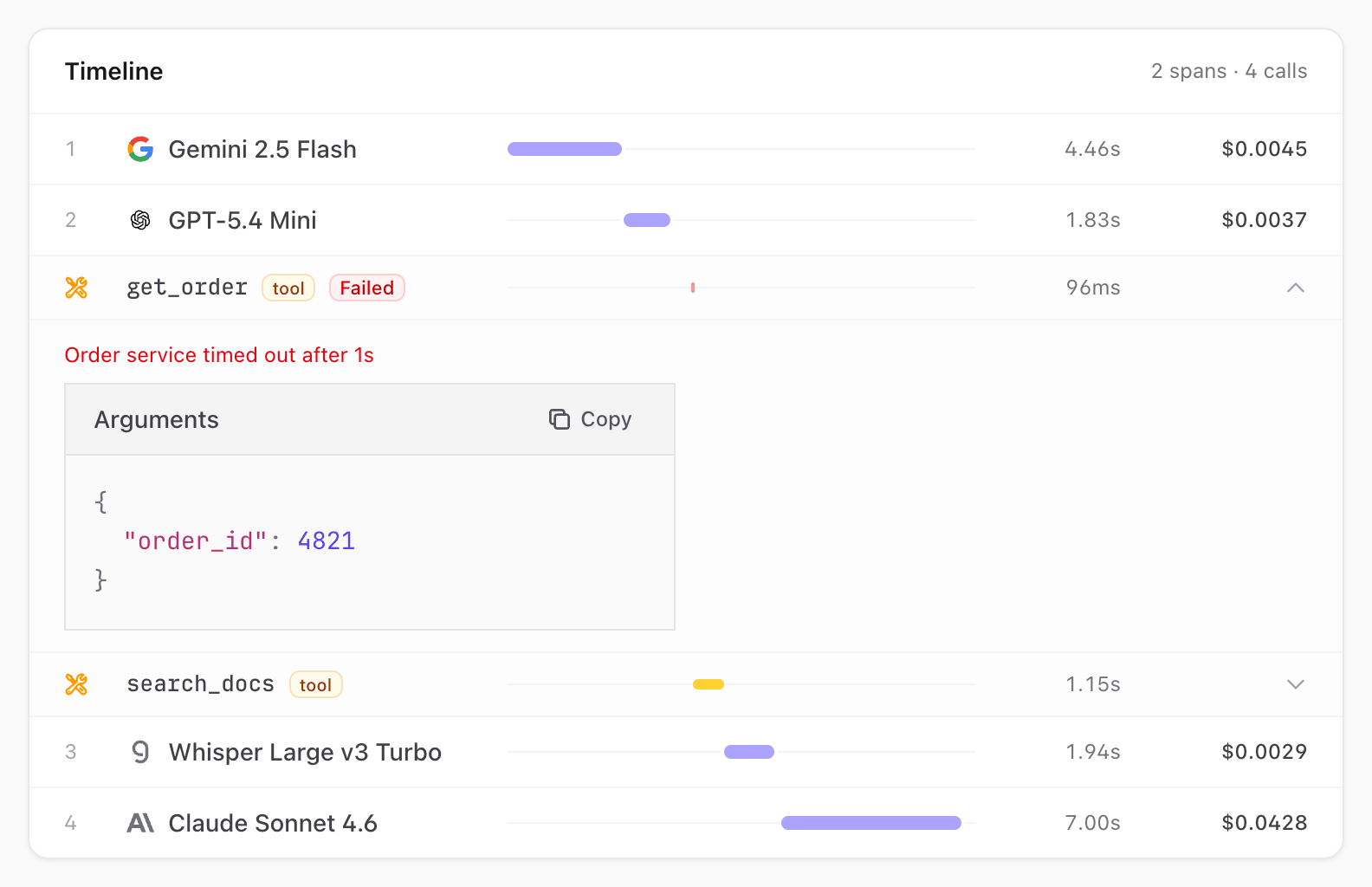
The trace timeline draws a tool with a wrench and an amber bar, between the calls that asked for it and got its result. Click it to see the arguments and the result:
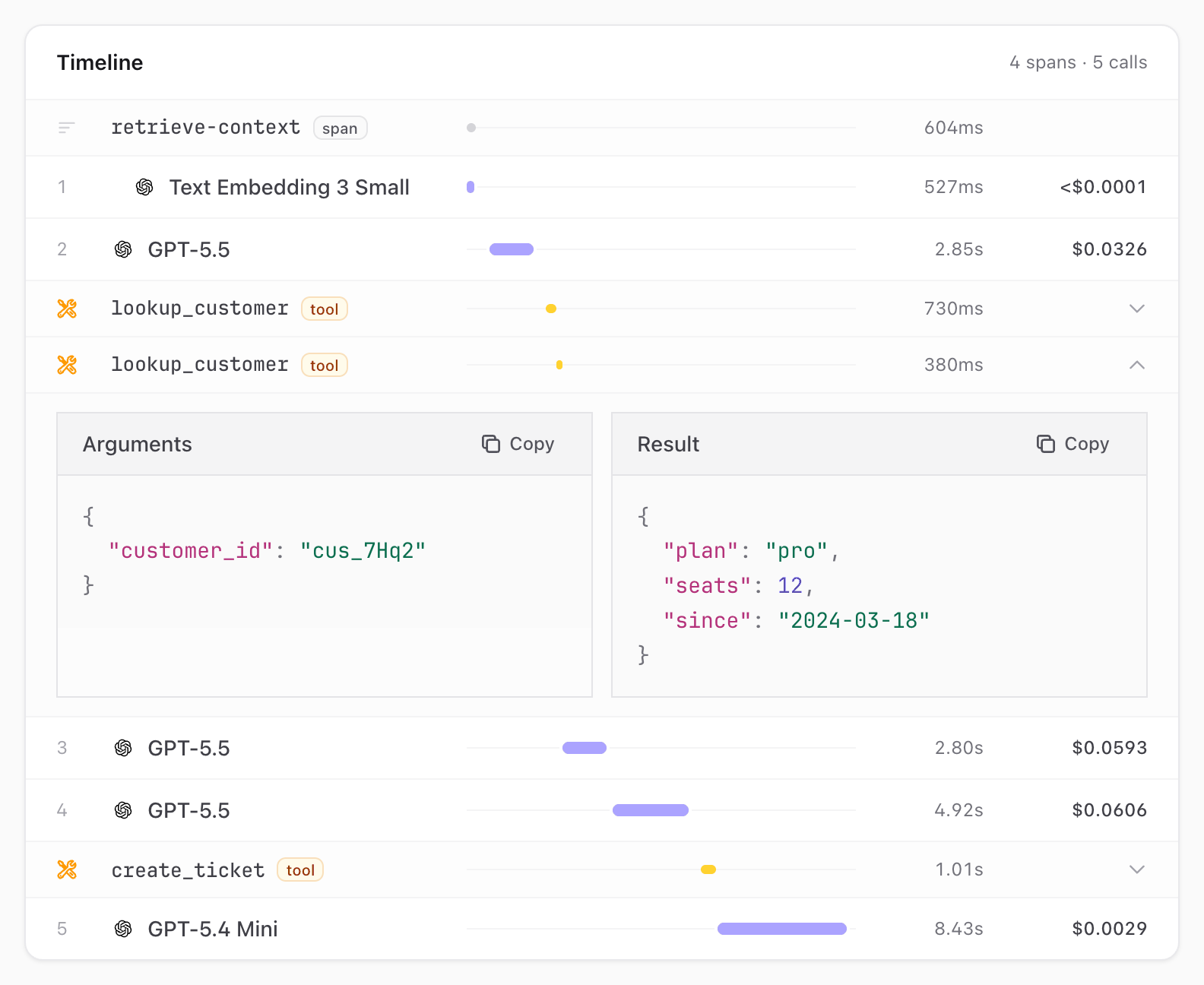
A failed tool has a red bar, and shows its error above the arguments:
OpenTelemetry
A tool span is exported as an INTERNAL span named execute_tool {name}, with gen_ai.operation.name set to execute_tool, as the OpenTelemetry GenAI conventions name tool runs. See Spans and Parents.
Testing
Spectra::fake() runs the tool and remembers it. Assert it ran, and check its arguments:
$fake = Spectra::fake();

// ...

$fake->assertToolCalled('get_weather');

$fake->assertToolCalled('get_weather', fn (array $arguments) => $arguments['city'] === 'Paris');
See Testing.