
Scores
Spectra records what every AI call cost and how long it took. It can't tell on its own whether the answer was any good. A score is that missing piece: a grade attached to an answer, so the dashboard shows quality next to cost.
What Is a Score?
A score is a named value attached to one AI call, to a trace (all the calls made for one user action) or to a conversation. The name says what it measures. The value is one of three kinds:
| Kind | For example | Value |
|---|---|---|
| Yes or no | A thumbs up or down | true or false |
| A number | A 1-5 star rating, an accuracy of 0.8 | Any number |
| A category | positive, wrong-facts | A short label |
Scores come from four places, and each score records which one:
- Your users, through a thumbs up button under the answer.
- A model, usually a cheaper one, that reads the answer and rates it.
- A reviewer on your team, grading answers in an annotation queue.
- Your code, with any check you run, such as whether the answer parsed as JSON.
Use the same name for the same measure (helpful for every thumbs up), so the dashboard can add them up.
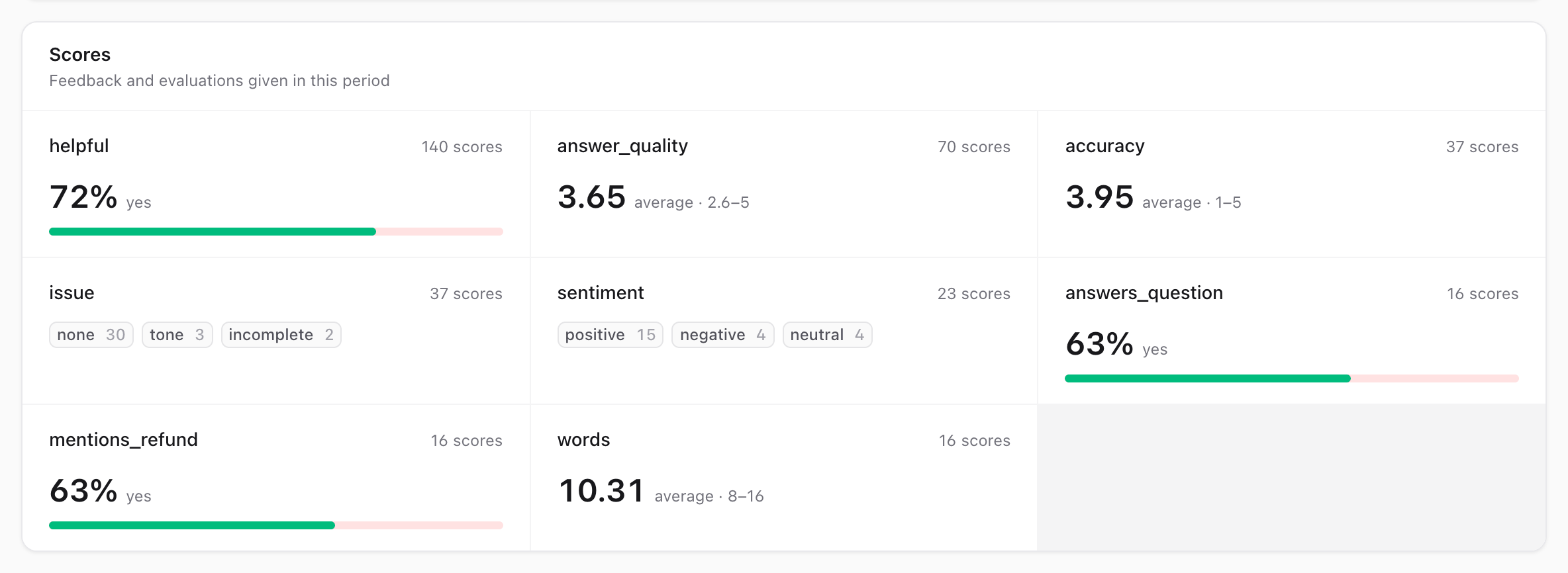
The dashboard shows each call's, trace's and conversation's scores, and the Overview sums up every score name for the period: the share of yes, the average, or the most common labels.
Recording a Score
Record a score with Spectra::score(). The type of the value sets the kind of the score:
use Spectra\Enums\ScoreSource;
use Spectra\Facades\Spectra;

// Yes or no: a thumbs up or down.
Spectra::score('helpful', true, traceId: $traceId, source: ScoreSource::User);

// A number: a rating, an accuracy.
Spectra::score('answer_quality', 4.5, request: $requestId, source: ScoreSource::Model);

// A category.
Spectra::score('sentiment', 'positive', conversationId: $chat->id);| Argument | |
|---|---|
name | What the score measures, up to 100 characters. Use the same name for the same measure, so the Overview can sum it. |
value | true / false, a number, or a category name. |
request | The AI call: its id, or the SpectraRequest. A model also gives the score the call's trace and conversation. |
traceId | The trace. |
conversationId | The conversation. |
comment | Free text, such as what the user wrote with their thumbs down. |
source | Who gave it: ScoreSource::User (an end user), Model (a model judging the answer), Annotation (a reviewer; see Annotation Queues) or Api (your code, the default). |
author | The Eloquent model who gave it, usually the user. |
metadata | Any other key-value context, such as the judge model's name. |
Without request, traceId or conversationId, the score goes to the trace of the current request, job or command.
Spectra::score() returns the saved SpectraScore, or null when it could not be saved: Spectra is disabled, the scores migration hasn't run yet, or the database failed (the error goes to your exception handler). A missing name, a missing target or a value it can't store throws an InvalidArgumentException, because that is a bug in the calling code.
User Feedback
Feedback usually arrives in a later HTTP request than the answer it rates: the user reads the answer, then clicks a thumb. By then Spectra has no way to know which answer the click is about. Send the answer's trace id along with the answer, and pass it back with the feedback. Without it, the score would go to the feedback request's own trace.
use Spectra\Facades\Spectra;

// When answering
public function ask(Request $request)
{
    $answer = $this->agent->answer($request->input('question'));

    return response()->json([
        'answer' => $answer,
        'trace_id' => Spectra::currentTraceId(),
    ]);
}

// When the user rates the answer
public function feedback(Request $request)
{
    Spectra::score(
        'helpful',
        $request->boolean('helpful'),
        traceId: $request->input('trace_id'),
        comment: $request->input('comment'),
        source: ScoreSource::User,
        author: $request->user(),
    );

    return response()->noContent();
}
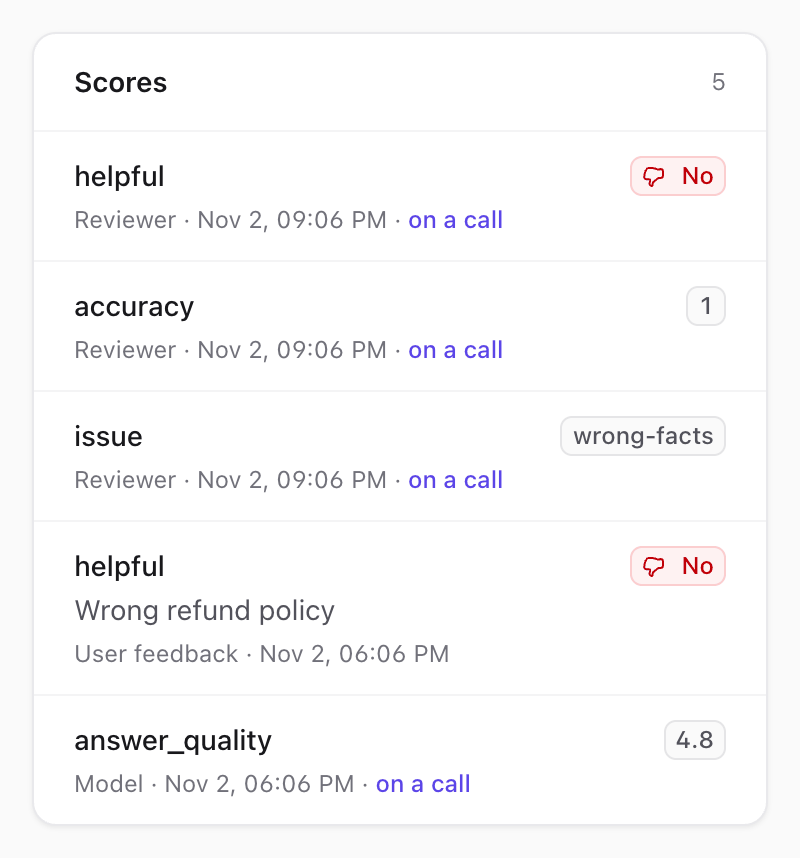
The trace's page lists its scores with their source, author and comment:
Scoring One Call
To score one AI call instead of the whole trace, use its id. Inside Spectra::track(), the context's id is the id the call is saved under:
$answer = Spectra::track('openai', 'gpt-5.4', function ($context) use ($question) {
    $response = OpenAI::chat()->create([...]);

    // For example, have a cheaper model judge the answer later.
    JudgeAnswer::dispatch($context->id, $question, $response->choices[0]->message->content);

    return $response;
});// In JudgeAnswer::handle()
Spectra::score('answer_quality', $rating, request: $this->requestId, source: ScoreSource::Model, metadata: [
'judge' => 'gpt-5.4-mini',
]);A call tracked on its own (through the HTTP client or the OpenAI SDK) reaches your code in the RequestTracked event, whose $request['id'] is its id.
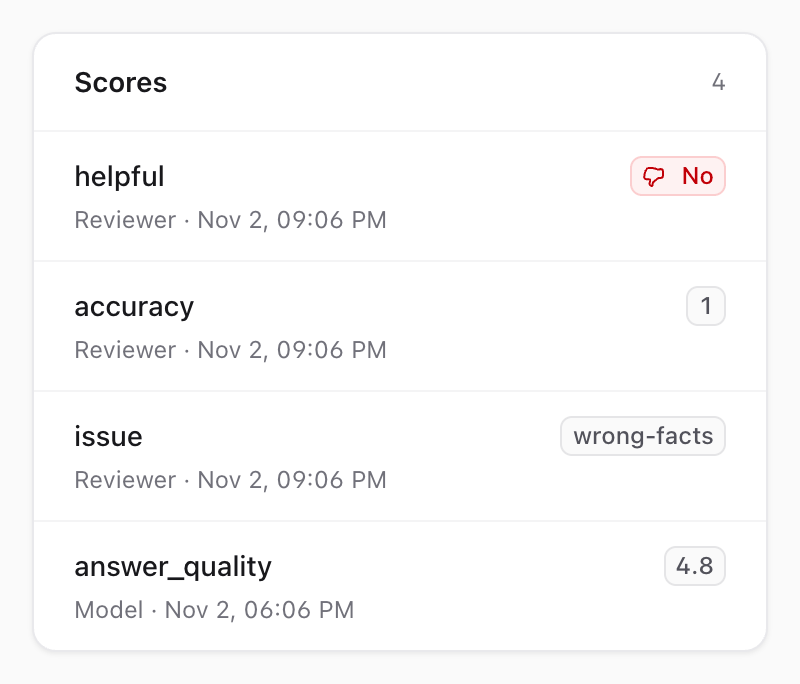
The call's page lists the scores given to it:
Reacting to Scores
Every saved score dispatches Spectra\Events\ScoreRecorded with the SpectraScore:
use Spectra\Events\ScoreRecorded;

Event::listen(function (ScoreRecorded $event) {
    if ($event->score->name === 'helpful' && $event->score->displayValue() === false) {
        // Flag the conversation for a support agent.
    }
});
Querying Scores
Scores are stored in the spectra_scores table, through the Spectra\Models\SpectraScore model:
use Spectra\Models\SpectraScore;

$unhelpful = SpectraScore::query()
    ->where('name', 'helpful')
    ->where('value', 0)
    ->where('created_at', '>=', now()->subWeek())
    ->count();
value holds numbers, and 1 / 0 for yes/no scores. label holds categories. displayValue() returns the score as it reads: a number, true or false, or the category.
spectra:prune deletes scores older than its cutoff, together with the requests. See spectra:prune.
Testing
With Spectra::fake(), scores are checked the same way but kept in memory. See Testing.