
Prompts
A prompt is the text you send a model along with the user's message: the instructions, the examples, the rules about tone. You will change it many times. Each time, you want to know whether the new wording is better: does it fail less, cost less, answer faster, and do users rate it higher?
What Is a Prompt Version?
Spectra treats a prompt as a named template, and every edit of it as a new version. Tag each AI call with the name of the prompt it used and the version, and the dashboard's Prompts screen puts the versions side by side: calls, failures, cost, latency and scores per version.
Spectra doesn't store or manage your prompts. You keep them where they are, in code, files or a database, and tell Spectra which one a call used.
Tagging Calls With a Prompt
Wrap the code that sends the prompt in Spectra::withPrompt(). Every AI call inside the callback is tagged with the prompt's name and version, whichever way it is tracked: the HTTP client, the OpenAI SDK, Laravel AI or Spectra::track():
use Spectra\Facades\Spectra;

$reply = Spectra::withPrompt('support-answer', 'v3', function () use ($agent, $message) {
    return $agent->prompt($message);
});
withPrompt() returns what the callback returns. Calls after the callback, and calls in queued jobs it dispatches, are not tagged. A stream started inside the callback keeps the prompt even when you read it later.
The name is any string up to 100 characters. Use the same name for every version of a prompt, so the screen can group them. The version is any string up to 50 characters: v3, 2026-11-04, a git commit, or the id of the prompt's row in your database. Longer names and versions are cut.
To tag one call tracked with Spectra::track(), pass the prompt in the options, or set it on the context:
Spectra::track('openai', 'gpt-5.4', fn () => $client->chat()->create([...]), [
    'prompt_name' => 'summarize',
    'prompt_version' => 'v2',
]);

Spectra::track('openai', 'gpt-5.4', function ($context) use ($client) {
    $context->usingPrompt('summarize', 'v2');

    return $client->chat()->create([...]);
});
The options win over withPrompt(), so a call inside the callback can name another version.
Comparing Versions
The dashboard's Prompts screen lists each prompt with its versions, the most recently used first:
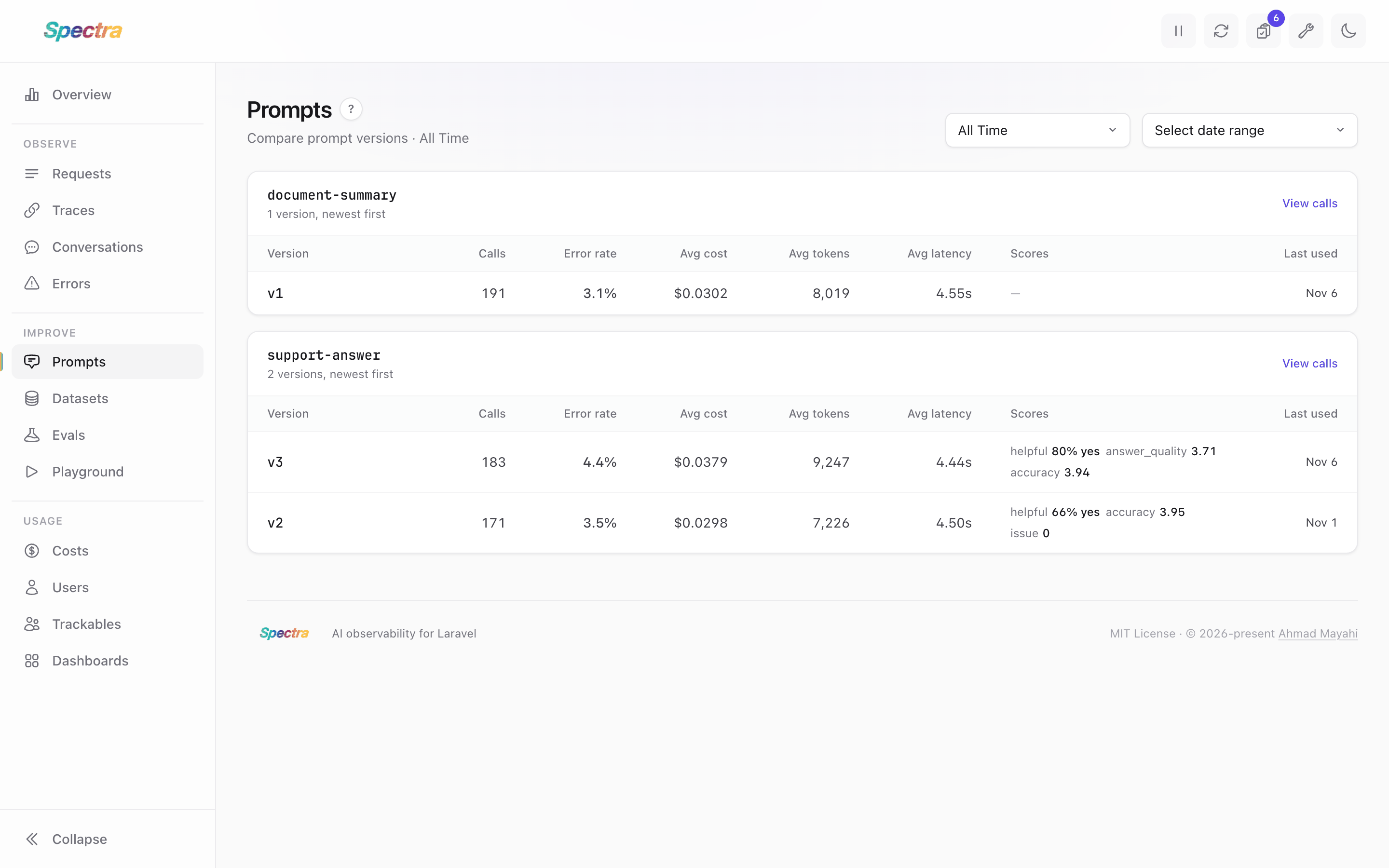
For each version in the period it shows:
- Calls and the error rate: the share of calls that failed.
- Avg cost and avg tokens per call, and the avg latency of the calls that succeeded.
- Scores: the share of yes or the average of the version's top three score names. A score counts for a version when it was given to one of the version's calls, or to the trace a call ran in.
- Last used.
Click a version to see its calls in the requests list. The requests list takes prompt_name and prompt_version filters, and each call's page shows the prompt it used.
To try a new wording on one real call before you change your code, open the call in the Playground.
To compare versions on user feedback, record the feedback as a score on the trace the answer came from.
Rolling Out a New Version
To compare two versions over the same days, send a share of traffic to the new one. Here one call in ten uses v4:
$version = Lottery::odds(1, 10)->choose() ? 'v4' : 'v3';

$reply = Spectra::withPrompt('support-answer', $version, fn () => $agent->prompt(
    view("prompts.support-answer.{$version}", ['message' => $message])->render()
));
Storage
The prompt is stored in the prompt_name and prompt_version columns of spectra_requests, added by the prompt columns migration. Until it runs, Spectra saves calls without the prompt and logs a warning once per process.